
Install on Wix
Add the Luria tag to your Wix site's head with Custom Code, then report conversions from your confirmation page.
About 6 minutes
What you'll need
- Your Luria tag, with your site ID already in it. You get it during onboarding, or email hello@luriart.com and we will send it to you. The dashboard does not show the site ID yet.
- Owner or Admin access to the Wix site.
- A Wix Premium plan with a connected domain. Wix only allows custom code on premium sites.
Step 1: Open Custom Code
In your Wix dashboard, go to Settings, then Custom Code under Advanced, then click "Add Custom Code".
Step 2: Paste the tag into the head
Paste this, with your own site ID in place of YOUR_SITE_ID:
<script async src="https://luriart.com/snippet.js" data-luria-site="YOUR_SITE_ID"></script>Set the options like this:
| Option | Choose |
|---|---|
| Add code to pages | All pages |
| Load code on each new page | Yes |
| Place code in | Head |
Name it "Luria" so you can find it later, then click Apply.
Paste it whole
Luria reads your site ID off the tag itself. If you retype the ID, wrap the tag in other markup, or split it across two code blocks, nothing loads and your site is untouched.
Step 3: Tell Luria when someone converts
Add a second Custom Code entry. This time choose "Add code to specific pages" and pick your confirmation or thank-you page, and place it in "Body - end". Paste this:
<script>
  (function () {
    var n = 0;
    (function go() {
      if (window.luria) return window.luria.convert("purchase", 129.00);
      if (++n < 40) setTimeout(go, 250);
    })();
  })();
</script>
Change the goal name and value to match what you sell. Use window.luria.convert("purchase", 129.00) for an order with a value, or window.luria.convert("lead") for a form or signup with no value. The short retry loop is there because the tag loads asynchronously, so window.luria can appear a moment after the page does.
Luria also counts a conversion on its own when the page path is /thank-you, /thank_you, or /orders/ plus an order token. Add the call anyway. The automatic one is recorded, but split test results only count conversions you name yourself.
Verify it worked
- Publish the site and open it in a private window with ad blockers off.
- View the page source. The tag should sit inside
<head>. - Open DevTools, go to Network, filter for
luriart.com. You should see calls to/api/patchesand/api/events, and/api/consentthe first time. - In the Console, type
window.luria. It should return an object, notundefined. - Place a real test order or submit the form, then open the Customers section on your dashboard's Overview tab. The converted visit appears there.
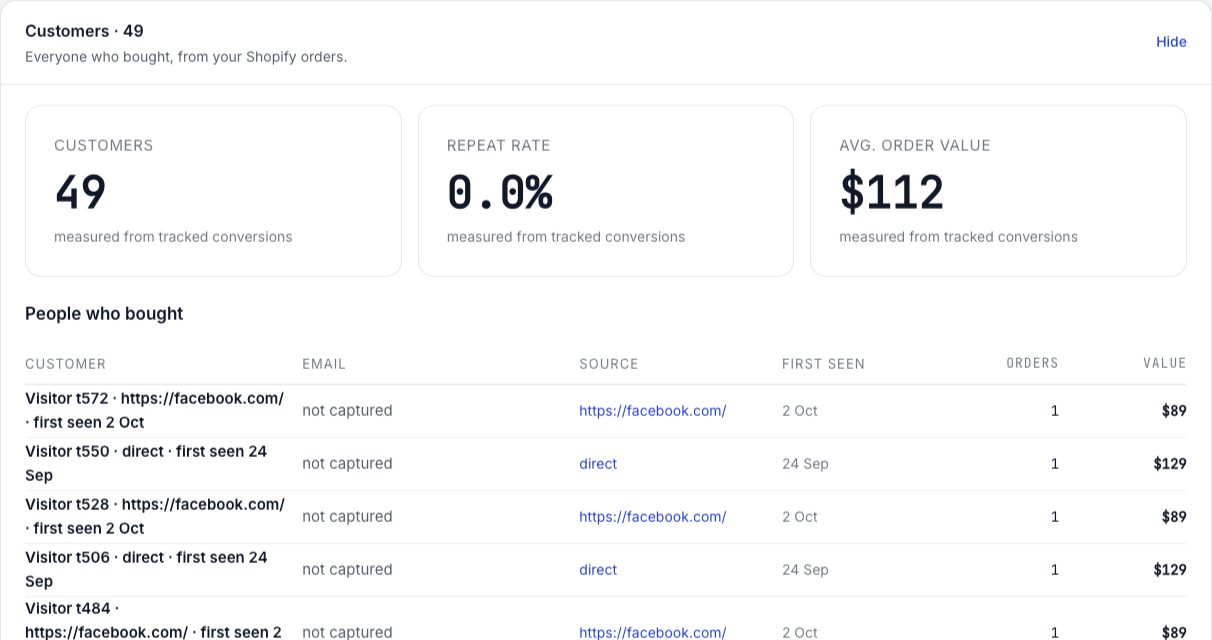
Full checklist: Verify your install.
Common failures
Wix blocks custom code on free sites. You need a Premium plan with a connected domain.
Three usual causes. The tag is missing its site ID, so the snippet stops immediately. Global Privacy Control or Do Not Track is on in your test browser, in which case Luria collects nothing at all by design. Or you are in a region where Luria shows its own small consent banner and you declined, which is stored in the browser; clear the site data and choose Accept to test again.
It still works. Changes just land later, so visitors may see the original text for a moment first. Move it to Head.
Harmless. Luria ignores the second copy rather than counting twice. Remove the spare anyway.
You called window.luria.convert twice on the same page. Call it once.
Luria runs once per full page load and does not re-run when a page changes in place without reloading. Install it on your marketing, landing and product pages.