
Install on WordPress
Add the Luria tag to a WordPress site with a header plugin or your theme's functions file, then count form submissions on the thank-you page.
About 8 minutes
This is the guide for WordPress sites that are not stores: blogs, service sites, lead-gen and landing pages. Selling with WooCommerce? Use Install on WooCommerce instead.
What you'll need
- Your Luria tag, with your site ID already filled in. Luria gives you the tag during onboarding, or by email from hello@luriart.com. The dashboard does not show the site ID yet.
- WordPress admin access
- A code plugin such as WPCode (formerly Insert Headers and Footers), or a child theme you can edit
Steps
Step 1: Put the tag in the head
The quickest route: Plugins → Add New, install and activate WPCode, then open Code Snippets → Header & Footer. Paste the tag into the Header box and click Save Changes.
<script async src="https://luriart.com/snippet.js" data-luria-site="YOUR_SITE_ID"></script>Prefer no extra plugin? Add this to your child theme's functions.php:
add_action( 'wp_head', function () {
  ?>
  <script async src="https://luriart.com/snippet.js" data-luria-site="YOUR_SITE_ID"></script>
  <?php
} );
Classic themes also expose Appearance → Theme File Editor → header.php, where the tag goes just above </head>. Block themes (the default themes since WordPress 5.9) have no header.php, so use one of the two options above.
Page builders have their own boxes that work too: Elementor under Site Settings → Custom Code, Divi under Theme Options → Integration, Bricks under Settings → Custom code. One box is enough. Two copies of the tag is not a problem, the snippet ignores the second, but it makes the next person's job harder.
Step 2: Count your conversion
Most WordPress sites convert on a form. The no-code path: set the form's confirmation to redirect to a page whose URL ends in /thank-you. Luria counts a visit to that path as a conversion on its own, once per browser.
- WPForms: Settings → Confirmations → Confirmation Type → Go to URL
- Gravity Forms: Settings → Confirmations → Redirect
- Fluent Forms: Settings & Integrations → Confirmation Settings → Redirect to URL
Want to name the goal yourself, or send a value? Put the call on the thank-you page in a Custom HTML block:
<script>
  (function go(n) {
    if (window.luria) return window.luria.convert("lead");
    if (n < 50) setTimeout(function () { go(n + 1); }, 200);
  })(0);
</script>
The loop waits for the tag to finish loading, up to about ten seconds. Use window.luria.convert("purchase", 129.00) if the page knows an order value. Call it once per page.
Step 3: Clear your cache
WP Rocket, LiteSpeed Cache, W3 Total Cache, WP Super Cache and your host's own cache all keep serving the old <head>. Purge, then reload the site.
Verify it worked
- Open your site in a private window with ad blockers off. If you are in the EU, UK or Switzerland, Luria shows a small consent banner; click Accept, since nothing is tracked before you answer it.
- View the page source. The tag is inside
<head>with your site ID in it, notYOUR_SITE_ID. - In the browser's Network tab, look for a request to
luriart.com/api/events. Events are batched, so give it a couple of seconds. - Submit the form yourself. On luriart.com/app, open Overview and its Customers section: the Customers count goes up by one and that visit is listed with its source.
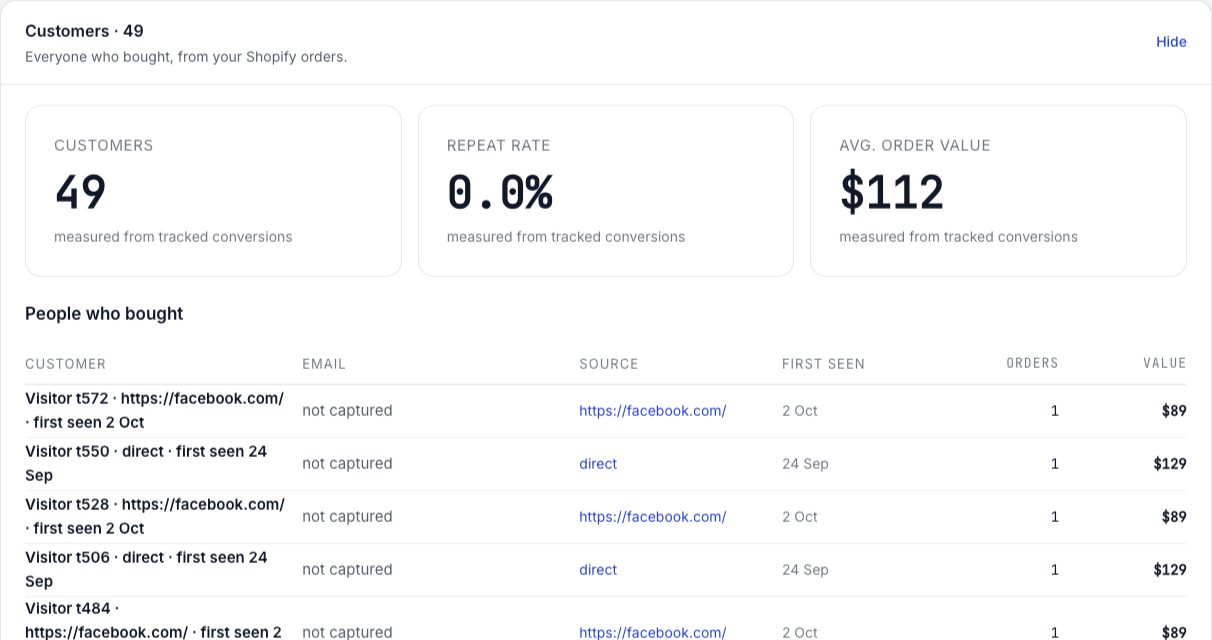
Full checklist: Verify your install.
Common failures
- Nothing tracked at all. The tag is missing its site ID or the ID has a typo. Without a valid
data-luria-sitethe snippet stops immediately. - Tag not in the source. A caching or optimisation plugin is serving the old head, or a "defer all JavaScript" setting moved the tag. Purge the cache and exclude
luriart.comfrom script optimisation. - Form submits, nothing counted. The form shows an inline message instead of redirecting, so the URL never changes. Switch to a redirect, or put the conversion call in the message block.
- Counted twice. The call sits on the page twice, or you added it to a page that already ends in
/thank-youso the automatic count fired as well. Keep one. See Duplicates. - Nothing in the test browser. Global Privacy Control or Do Not Track is on, or you clicked Decline on the banner earlier. Luria collects nothing in both cases. Clear the site data and try again.
- Blocked by your own site. A Content Security Policy that does not allow Luria stops the script. Add
https://luriart.com https://www.luriart.comtoscript-srcandconnect-src(both hosts:luriart.comredirects towww).