
Quickstart
From luriart.com/onboarding to your first live split test, on Shopify, GoHighLevel, Cloudflare, Vercel or any site.
About 10 minutes
Scan your site
Open luriart.com/onboarding, tick the permission box, type your site, press Start the scan.
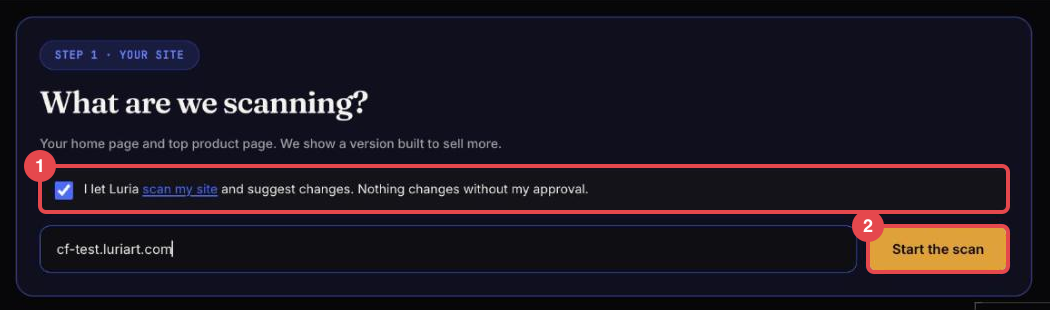
Luria opens your public pages in a real browser. It changes nothing.
Say where your site lives
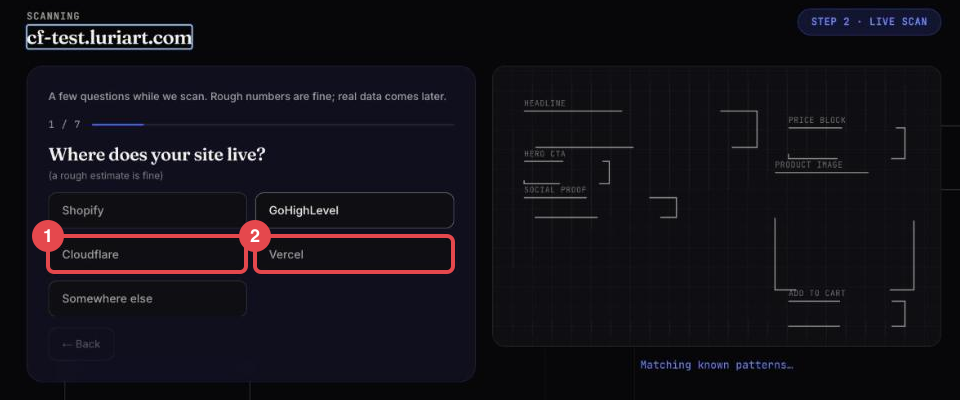
Pick Shopify, GoHighLevel, Cloudflare, Vercel or Somewhere else, then answer a few rough questions.
Get your account and your tag
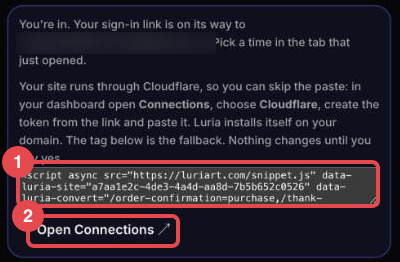
Read the before and after, type your email, tick the consent box, press the button. Your account is made and your sign-in link is emailed. The card then shows your next step for your platform, with your tag already filled in.
Install on your platform
Not on Shopify? The first time you sign in to your dashboard, a connect pop-up covers it and walks you through your platform's steps. It closes on its own as soon as Luria sees the first real visit to your site. On GoHighLevel it also waits until your sub-account is connected for the first time.
Start a test
In the dashboard open Split Tests → Create new test, or ask in Chat. Nothing goes live until you press Start this test.
Check it works
Open your site in a private window. Within a minute the visit shows in Split Tests. Full checklist: Verify your install.
No sign-in email after ten minutes? Email hello@luriart.com.