
What Luria does
Luria runs split tests on your own pages, measures them against a held-out control, and moves traffic to the winner.
Luria is a split tester for your own pages. It writes small changes to your store, shows them to some of your visitors, keeps your original page in front of the rest, and reports which one made more money.
What you'll need
An installed site (your store's private Luria app on Shopify, a connection or the script tag anywhere else) and traffic. Nothing else. You do not write variants, pick selectors, or configure a stats engine.
What it does
Step 1: It reads your pages and builds the tests
The onboarding scan reads your homepage and top product page, and your seven answers set the goal (Sales, Booked calls, Leads / emails, App downloads). Luria turns that into tests. You never build one yourself.
Step 2: It patches text and style, nothing else
A variant is a small text or style patch: a headline, a call to action, an offer, social proof, imagery or body copy. Layout is off by default. Checkout legal text, privacy and terms pages, and prices without approval are always off and not negotiable.
Luria never edits your theme code. Patches are layered on at page load, capped at 250ms of anti-flicker, and any error means the page renders exactly as if Luria were not there.
Step 3: Luria runs the tests, unless you ask to approve first
On the Settings tab, "How changes go live" has two settings. Run on its own is the default: Luria starts each next test and keeps winners itself. Approve first makes every change wait for your go-ahead, and everything stays reversible either way.
Each test waiting on you has a Run this test button on the Split Tests tab. See Approving changes.
Step 4: It measures against a held-out control
Part of your traffic always keeps the original page. Both arms run at the same time on the same traffic, so the comparison is not a before-and-after guess. A visitor is assigned by a sticky hash and keeps the same arm on every visit.
Step 5: It moves traffic while the test is still running
As results come in, more traffic goes to the arm that is winning. The control never drops below 10% of traffic. A variant is promoted only above 95% probability of beating control with at least 200 sessions per arm, and is killed below 5%. Details: How a test is measured.
Step 6: It reports in the dashboard, with heatmaps and session replay
Luria records first-party heatmaps and sampled session replays of your own pages (consent-gated, form inputs masked, no third-party analytics), so you can see where visitors click, stall and leave on each arm.
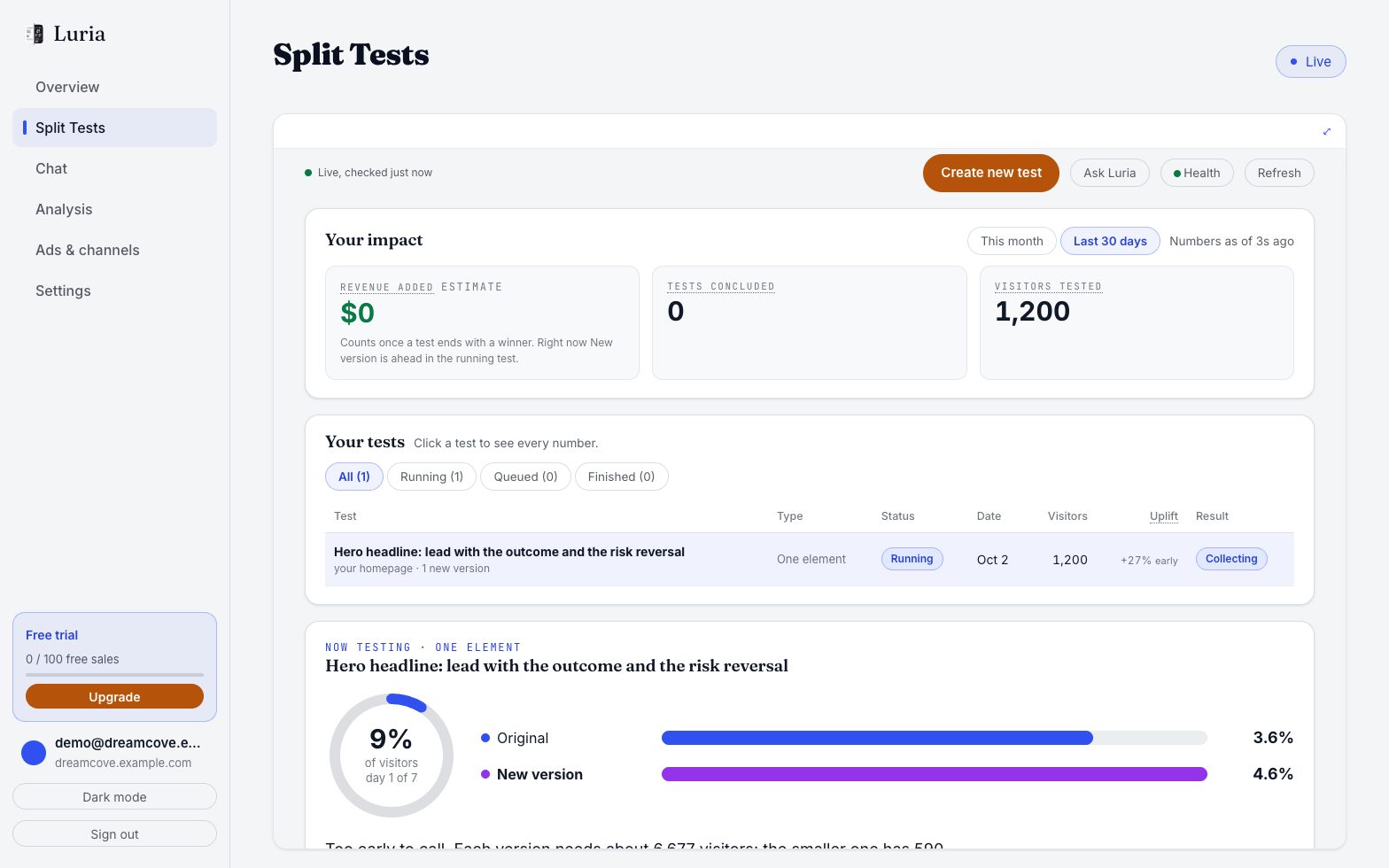
Six tabs at luriart.com/app: Overview (what tests added, tests running and finished, your store numbers, leads and customers), Split Tests (every test, both versions' rates, the change log with roll-back), Chat (ask Luria or start a test by hand), Analysis (recordings and heatmaps), Ads & channels (pages matched to each ad or traffic source) and Settings (the rules above, your plan, your site). See Your dashboard.
What Luria is not
- Not ad tracking and not ad attribution. Luria measures conversions on your own site against its own control arm. It does not tell you which ad or campaign made a sale.
- No ad platform connections. There is no Meta, Google, TikTok, Klaviyo or Google Analytics integration.
- Not a page builder. Luria patches text and style on pages you already have.
There is also no per-source targeting, no team access (one user per site), no goal selector in the dashboard (the goal is set in onboarding), and no API keys screen.
Common misunderstandings
- "It changed my theme." Only by one script tag. On Shopify the Luria app adds it to your theme and removes it when you uninstall; elsewhere you add it yourself. Remove it and your pages are exactly what they were.
- "I can't stop it." You can. Pausing stops serving within about 60 seconds, and uninstalling the Shopify app stops it too. Ask us at hello@luriart.com; it is not a dashboard toggle today.
- "The numbers should match Shopify." They will not. Luria counts attributed orders net of full refunds, tied to sessions that saw a test. See Numbers don't match Shopify.
- "Variants stopped." After 100 free attributed conversions with no plan active, variants pause and measurement keeps running. See Plans and metering.