
Install on ClickFunnels
Add the Luria tag to a funnel's head tracking code, then count the conversion on your order confirmation step.
About 6 minutes
What you'll need
- Your Luria tag, with your site ID already in it. You get it during onboarding, or email hello@luriart.com and we will send it to you. The dashboard does not show the site ID yet.
- Edit access to the funnel.
- To know which version you are on. ClickFunnels 2.0 and Classic put tracking code in different places, and both are covered below.
Step 1: Open the funnel's tracking code
In ClickFunnels 2.0, open the funnel, go to Settings, then Tracking Codes, and find the head box.
In Classic, open the funnel, go to Settings, then Tracking Code, and find the Header Code box.
Step 2: Paste the tag
Paste this into the head box, with your own site ID in place of YOUR_SITE_ID, then save:
<script async src="https://luriart.com/snippet.js" data-luria-site="YOUR_SITE_ID"></script>Funnel-level head code runs on every step of that funnel, which is what you want: Luria needs to see the landing step and the confirmation step to tie a conversion back to the version that was live.
Paste it whole
Luria reads your site ID off the tag itself. If you retype the ID, wrap the tag in other markup, or split it across two boxes, nothing loads and your funnel is untouched.
Step 3: Count the conversion on the confirmation step
Open your order confirmation or thank-you step, open that step's own tracking code, and paste this into its head or footer box:
<script>
  (function () {
    var n = 0;
    (function go() {
      if (window.luria) return window.luria.convert("purchase", 97.00);
      if (++n < 40) setTimeout(go, 250);
    })();
  })();
</script>
Change the goal name and value to match the offer. Use window.luria.convert("purchase", 97.00) for a sale, or window.luria.convert("lead") for an opt-in step with no value. The short retry loop is there because the tag loads asynchronously, so window.luria can appear a moment after the page does.
Luria also counts a conversion on its own when the path is /thank-you, /thank_you, or /orders/ plus an order token. Add the call anyway. The automatic one is recorded, but split test results only count conversions you name yourself.
Order bumps and upsells
Put the call on one step only, normally the final confirmation. Calling it on both an upsell page and the confirmation page counts the same buyer twice.
Count sales server-side instead
Want sales counted even when the buyer closes the tab before the confirmation step loads? Send ClickFunnels' purchase webhook (or a Zapier or Make step) to your Luria webhook URL instead, and remove the Step 3 line so a sale is not counted twice. Setup and field mapping: Webhooks.
Verify it worked
- Publish the funnel and open the live URL in a private window with ad blockers off.
- View the page source. The tag should sit inside
<head>. - Open DevTools, go to Network, filter for
luriart.com. You should see calls to/api/patchesand/api/events, and/api/consentthe first time. - In the Console, type
window.luria. It should return an object, notundefined. - Run one real test purchase or opt-in, then open the Customers section on your dashboard's Overview tab. The converted visit appears there.
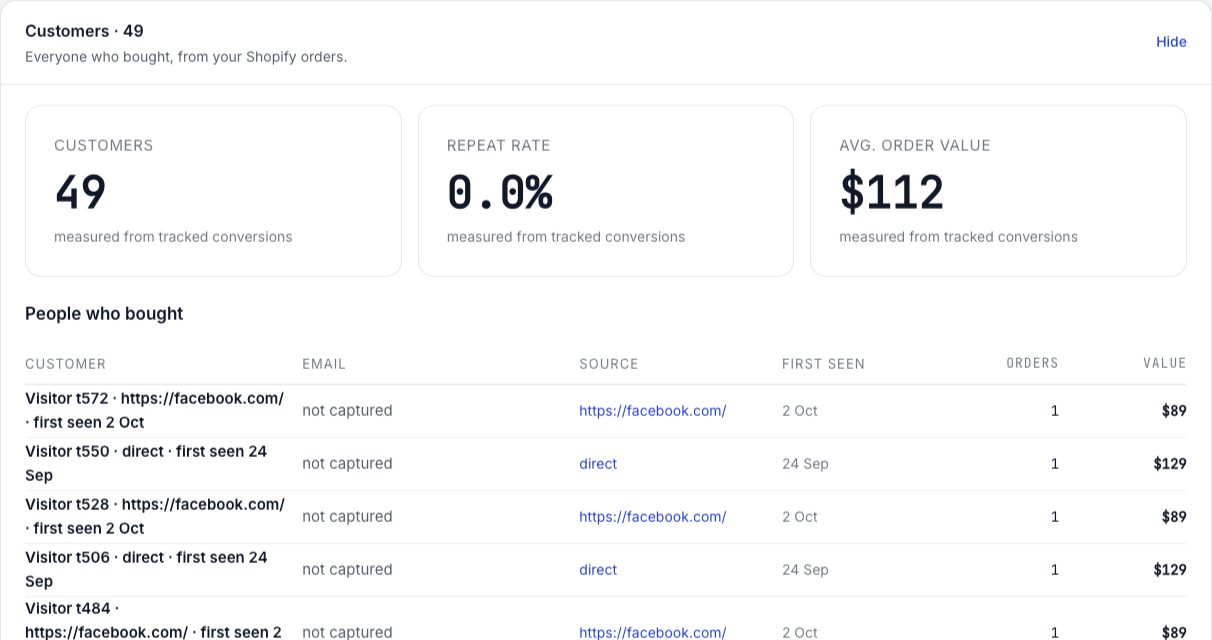
Full checklist: Verify your install.
Common failures
You pasted it into a single step instead of the funnel's tracking code. Move it up to funnel level so every step loads it.
The tag is missing its site ID, so the snippet stops immediately. Or Global Privacy Control or Do Not Track is on in your test browser, in which case Luria collects nothing at all by design. Or you are in a region where Luria shows its own small consent banner and you declined; clear the site data and choose Accept to test again.
The conversion is being auto detected rather than named. Add the explicit window.luria.convert(...) call to the confirmation step.
window.luria.convert ran twice, usually because it is on two steps. Call it once.
Harmless. Luria ignores the duplicate rather than counting twice. Remove the spare anyway.